
Wix has just launched Wix Harmony, a brand-new editor that promises to merge artificial intelligence and visual control in a single tool. If you own a business in Quebec and use Wix, this announcement affects you directly. The catch is that nobody here in Quebec is talking about it yet.
We tested Wix Harmony in depth to give you a realistic picture of what this editor does well, what it does poorly and, above all, whether it's worth it for your business today. No marketing talk. This is a hands-on review, based on our experience as a Certified Wix Partner in Quebec.
TABLE OF CONTENTS
- Aria, the AI agent at the heart of the editor
- Our honest review after testing Wix Harmony
- Wix Harmony vs Wix Studio vs the Wix Editor
- What it means for Wix businesses in Quebec
What is Wix Harmony?
Wix Harmony is Wix's new editor, launched in January 2026. It combines two ways of building a website: generation by artificial intelligence (what Wix calls “vibe coding”) and the good old drag-and-drop you already know.
In practice, you describe what you want in plain language, for example “create a services page with a contact form and testimonials”, and the AI generates a complete structure. Then you fine-tune each detail visually, pixel by pixel, as you would in the classic Wix Editor.
According to Wix's official press release, Harmony is designed to eventually replace the classic Wix Editor. In other words, Harmony is the direction Wix is taking for the future of its platform, well beyond an experiment. If you already have a Wix site, we cover what this means for you in the section “What it means for Wix businesses in Quebec” below.
Aria, the AI agent at the heart of Wix Harmony
At the centre of Wix Harmony is Aria, an AI agent built right into the editor. Forget external AI tools that generate code in a vacuum. Aria understands the full structure of your site (your pages, sections, content and design) and can act on it in real time.
What Aria can do in practice
You work with Aria through a conversation in plain language. Here's what the tool lets you do in practice: generate a complete site from a description, create individual pages or sections, change the overall design (colours, fonts, spacing), rewrite or improve text, add features such as a form, a store or a booking system, and generate native components with built-in logic.

The idea is appealing on paper. You describe, Aria builds, you refine. This is where things get interesting, and also where reality catches up with the promise.
Our honest review after testing Wix Harmony
When Wix announces an editor that will replace the one we use every day for our clients, we don't stop at reading the press release. We open the tool, push it to its limits and tell you what we think of it.
The interface: a clear step forward
The first pleasant surprise when you open Wix Harmony is how clean the interface is. The bulky toolbars of the classic editor are gone, replaced by a dynamic action bar that adapts to the element you select. Click a heading and the typography options appear. Select an image and the cropping and optimization tools show up on their own.
Automatic responsive design is worth a closer look. In the classic editor, adapting a site for mobile could easily take 3 to 5 hours of work on an 8- to 10-page project. With Harmony, the site adjusts itself to each screen size from the moment you create it.
You can still fine-tune the mobile version by hand, but the base is already solid. For a small business owner who manages their site alone, that's a considerable time saver.
Moving between AI mode and drag-and-drop works well too. You generate a section with Aria, adjust some spacing by hand, then ask the AI to rewrite a paragraph, all without leaving the editor. This hybrid approach is Harmony's main selling point over 100% AI tools, which lock you into their output with no way to fine-tune it.
Where Aria let us down: our tests in detail
Let's be frank about what happens when you use Aria for real, outside a marketing demo.
First test: we asked Aria to create an “Our services” section with three columns, each with a heading, a short description and a call-to-action button. The result came after a noticeable wait, 15 to 20 seconds for a fairly simple request. The generated structure was correct. The columns were there, and so were the buttons. The basic logic works.
Second test: we asked it to change the background colour of an existing section, an edit that takes literally two clicks in manual mode. With Aria, we had to word the request, wait for processing, then find that the AI had changed the right colour but also changed the heading's font size, a side effect we hadn't asked for. We rephrased to fix it. Another wait. This time the background colour went back to the original, but the button disappeared completely.
💡 TIP: If you try Aria, work on one element at a time. “Change the heading colour to dark blue” gets better results than “Redo this section so it looks more professional.” Above all, always check the elements around your change, because Aria tends to touch nearby elements without warning.
This prompt, wait, check and fix cycle quickly becomes exhausting. After an hour of testing, we had done what a 15-minute session of plain drag-and-drop would have achieved. For targeted edits, the result simply isn't worth the effort.
Third test: we created a complete site from a single descriptive prompt. Here, Aria performed much better. The overall structure was coherent, the sections followed each other logically and the base design was clean. The result works as a solid starting point. Once you go past two or three pages, though, visual consistency between pages starts to break down.

Our verdict: promising, but too early to adopt
The vision behind Wix Harmony is the right one. A hybrid editor that combines the speed of AI with the precision of manual control is what the Quebec market needs. The technical foundation is solid: automatic responsive design, Wix's infrastructure, and built-in commerce and booking tools.
But Aria's precision isn't at the level of a production tool yet. Responses take too long for simple edits, results are unpredictable on targeted requests, and overall stability falls short once you work on a project of more than one page.
As things stand, we don't recommend it for a complete business website. For a quick landing page or a temporary event site? It can work.
Wix Harmony vs Wix Studio vs the Wix Editor
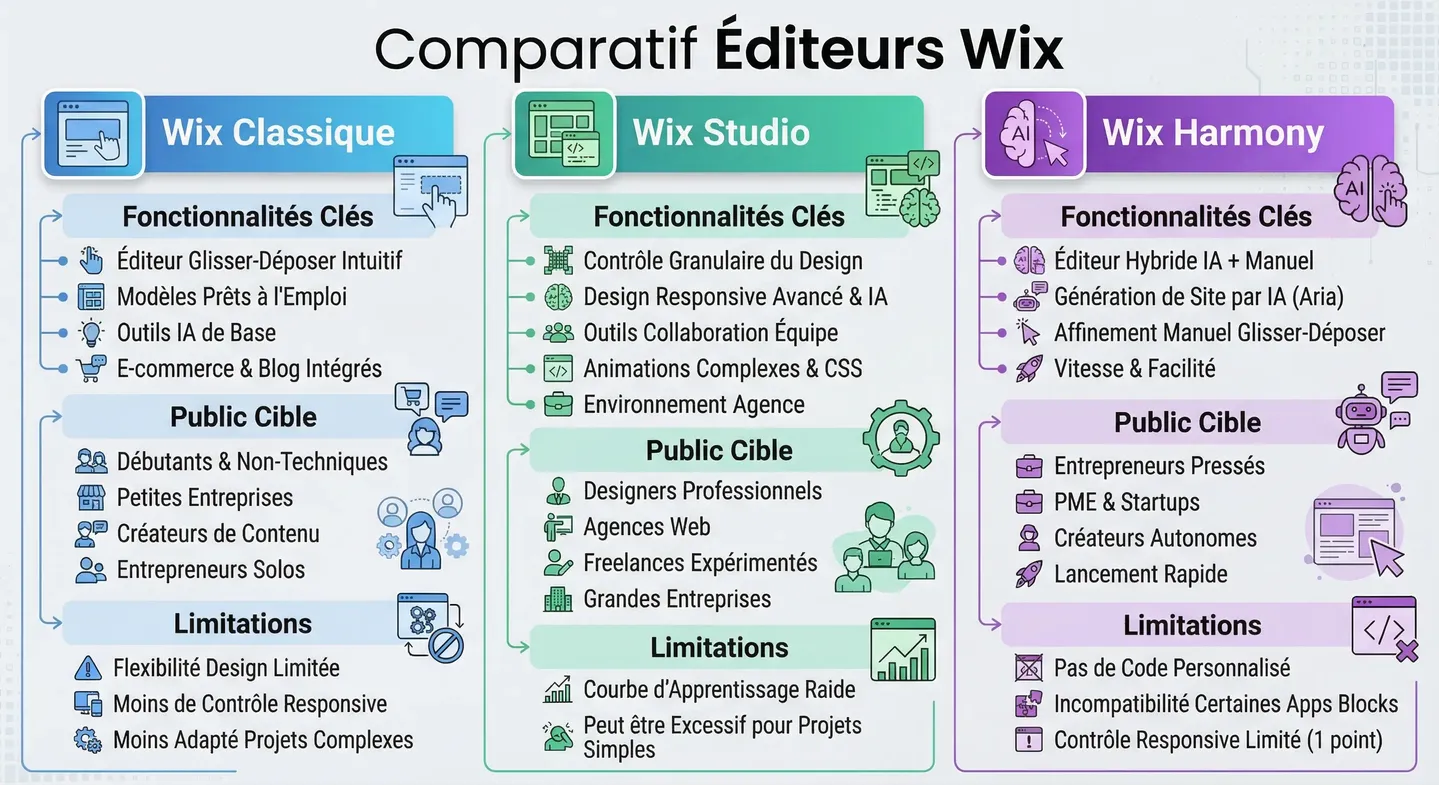
Wix now offers three separate editors, each designed for a different kind of user and project. To avoid repeating the same points from different angles, here's a structured comparison that covers each criterion once. We've already published a detailed comparison of Wix and Wix Studio. What follows adds Harmony to the mix.
How you build
The classic Wix Editor relies entirely on free-form drag-and-drop. You place each element wherever you want on the page, with no grid holding you back. It's powerful, but it takes a good eye for design to get a professional result. Wix Studio gives the layout more structure with flexible containers, CSS grids and custom breakpoints (the screen widths where the layout changes), an approach closer to modern web development. Wix Harmony starts with a conversation with the AI, then lets you adjust visually. It's the quickest of the three to learn, but it offers the least fine-grained control.
Responsive design and mobile
In the classic Wix Editor, the mobile version is a separate editor. Mobile adjustments are all done by hand, and a change on desktop doesn't always carry over to mobile. It's the longest process of the three. Wix Studio uses breakpoints. You set the points where the layout changes (tablet, mobile and so on), and the design adapts automatically, with the option to customize each view. Wix Harmony goes further with fully automatic responsive design from the moment you create the site, with no setup needed. It's its most practical day-to-day advantage.
Code and custom development
This is where the paths split the most. The classic Wix Editor lets you add code through Velo, Wix's own development platform (server-side and client-side JavaScript), along with API integrations and databases. Wix Studio offers the same coding capabilities, plus advanced design tools and an environment built for agencies and developers. Wix Harmony doesn't support it, which means no custom code at all. If your site relies on custom-built features, such as conditional logic, dynamic calculations or connections to outside systems, Wix Studio or the classic Wix Editor are your only options.
Pricing
All three editors use the same Wix pricing. Harmony is included in all plans, the free plan too, so you don't pay more to use it. We break down each tier in the FAQ below.
📌 NOTE: This comparison reflects the editors as of April 2026. Wix is developing Harmony quickly, and some features missing today could be added in the coming months. We'll update this article as needed.
What it means for Wix businesses in Quebec
You have a Wix site that works well and ranks well on Google, and you're wondering what to do about this announcement. Here's what it means for you in practice.
The language barrier
As of April 2026, Wix Harmony and Aria work in English only. If you run your business in English, that won't slow you down. For a Quebec business owner who works mainly in French and isn't fully bilingual, though, it's a real obstacle in daily use. Wix held a webinar in French to present the tool, which suggests French support is in the plans, but no official date has been announced.
Until then, all interactions with Aria have to happen in English, which limits the tool's reach for a large part of the Quebec market.
The migration question
If your site runs on the classic Wix Editor or Wix Studio, there's no “Migrate to Harmony” button. Moving over means a full rebuild. Aria can help you recreate content from a description of your current site, but it's still rebuild work, with nothing carried over for you.
For a small business whose site is well indexed, with pages ranking on Google and an established SEO history, the risk of losing rankings during a manual migration is real. We advise against switching until Harmony is more mature and an assisted migration process is available. If your current site still needs to evolve, our website redesign service plans each transition to protect the rankings you've already built.
What to do now: our recommendation
Is your current site working? Keep it. Focus your efforts on content, SEO and turning more of your visitors into customers, because that's what brings results today. Open a Harmony account on the side to explore it, understand how Aria works and judge for yourself whether the tool meets your needs.
💡 TIP: Want to try Wix Harmony without any risk? Create a side project, such as a seasonal promotion or a microsite for an event, on a separate account. You explore the tool at your own pace, and your main site stays intact if the result doesn't win you over.
If you're starting a brand-new business project with no existing site, Harmony could speed up getting a first version online. Then focus on content, brand and SEO, because that's what sets a site that brings in customers apart from a generic one.
Frequently asked questions about Wix Harmony
Will Wix Harmony replace the classic Wix Editor, and when?
Wix has confirmed that Harmony is its new flagship editor. The two editors will coexist during a transition period, and Wix hasn't said how long it will last.
Your current site on the classic editor will keep working normally, and Wix won't cut off access overnight. The transition will be gradual, and Wix has every reason to handle it smoothly, since millions of active sites depend on the classic editor.
Does SEO work well on a Wix Harmony site?
Wix Harmony inherits the SEO infrastructure of the Wix platform, which has come a long way in recent years. Title tags, meta descriptions, custom URLs, the automatic sitemap and schema markup (code that helps Google understand your pages) are all available. The technical infrastructure, from loading speed to multi-cloud hosting and SSL security, is the same as in the other editors.
What could cause SEO problems is content generated by Aria without human review. Google rewards original content that shows expertise and experience. A site generated entirely by AI, with no personalization or unique perspective, is likely to perform poorly in search results, whatever editor you use.
How much does Wix Harmony cost?
Access to the Harmony editor is included in all Wix plans. The free plan lets you try the tool, but your site will show Wix branding and you won't have a custom domain name. The paid plans break down as follows: Light at $17/month, Core at $29/month, Business at $36/month and Business Elite at $159/month (billed annually).
Each tier adds storage, commerce tools and marketing features. The right plan depends more on the features you need (a store, bookings, automations) than on the editor itself.
Can Wix Harmony build a multilingual site for the Quebec market?
Wix offers multilingual features through Wix Multilingual, and those tools are technically compatible with Harmony. However, because Aria only understands English, building your site in French gets more complicated.
You can generate a structure in English and then translate the content by hand, but that cancels out part of the speed the tool promises. For a bilingual French-English site aimed at the Quebec market, Wix Studio with Wix Multilingual remains the most effective and best-proven approach to date. It's also the platform we use for our Wix website design projects in Quebec.
Do Wix apps (Bookings, Stores, Blog) work on Harmony?
Most of Wix's major apps work with Harmony, including Wix Stores (online store), Wix Bookings (appointment booking) and Wix Blog. You can add them through the App Market right inside the Harmony editor. However, several third-party apps, some animation effects and certain visual elements aren't available yet.
Wix publishes a list of missing elements in its official documentation and updates it regularly. Before you start a project on Harmony, check that the apps you need are supported.
Conclusion
Wix Harmony marks a turning point in how Wix approaches website building. For the first time, the platform is betting on AI as the main engine for building a site. AI sits at the core of the editor, far more than a marketing gadget bolted onto the existing one.
What this says about the industry is bigger than the tool itself. Website builders are all moving toward hybrid models that combine AI with manual control, and Wix is among the first to ship a concrete product in that direction. The question is no longer whether AI will change web design. It's how quickly the tools will become reliable enough to replace the current workflow.
For Quebec businesses on Wix, the best strategy is still to get the most out of your current site while keeping Harmony on your radar. When the tool matures, and it will, you'll be in a good position to adopt it at the right time.
Want a personal opinion on your Wix project? Contact our team and we'll point you to the option that fits your business: Wix Studio, the classic editor or, eventually, Harmony.

Book your free strategy call
Have a doubt, a question, or just want to talk with a Wix expert? Our team is here to help you see clearly.
Click the button below for honest, transparent advice, with no commitment.